liveBPM - Beat Detector
Daniel BachMusic & Audio
4.2151.00 Reviews
- Version
- 1.2.2
- Installs
- 10.00K
- Age Rating
- Everyone
Screenshots
Our Review of liveBPM - Beat Detector
 Analysis by Appyee
I often notice a useful gap between hearing a steady pulse and knowing what tempo it actually is. liveBPM - Beat Detector is built to close that gap: it listens to music around your phone and turns the pulse into a BPM reading. That makes it more like a quick listening aid than a music player or a full studio tool, and that focus is what I find most appealing. When a groove feels faster or slower than expected, I can check it without interrupting the music to search for a separate tempo reference.
A tempo reading you can watch
The central idea is simple: use the phone’s microphone to pick up nearby music and show its tempo as it plays. In practice, the changing number gives me a concrete point of reference, while the visual beat display helps me follow the pulse without having to keep counting in my head. This is especially handy when I am trying to settle on a rehearsal tempo or compare the feel of two sections of a song.
That live feedback is different from looking up a track’s tempo after the fact. It is aimed at the sound in the room, so it can be useful with a band rehearsal, a record playing through speakers, or a rhythm being practiced nearby. I would treat the reading as a guide rather than an unquestionable measurement: a strong, clear beat is easier for a listening tool to follow than a loose groove, a very quiet pulse, or music buried under other sounds.
How it fits into a listening or practice session
I would start by placing the phone where the music comes through clearly, then give the reading a moment to settle before relying on it. That small pause matters when a song begins with an introduction, a pickup, or a deliberately sparse passage; the first sound is not always the main beat. For a more useful comparison, I would check the same section more than once rather than chasing every quick fluctuation on the display.
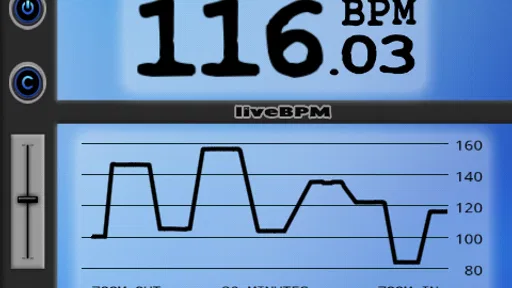
The history function adds value when I want to look back at a session instead of just catching one number. For example, I could note whether a passage tends to rush as a group gets louder, or whether the tempo changes between sections as intended. It will not replace careful rehearsal notes or a musician’s judgement, but it can give the group something specific to discuss: was that chorus actually faster, or did it only feel more energetic?
Best suited to hands-on music making
For a band, one realistic use is to leave the phone near the room’s main sound source while running through a song. If the drummer’s pulse gradually pushes ahead, the display can make that tendency easier to notice between takes. I would not expect the phone to decide who is right or to diagnose every timing issue; it is more helpful as a shared reference that prompts a conversation and a repeat run.
Dancers can use the same idea in a different way. When practicing to music, a tempo reading may help distinguish a genuinely quick track from one that merely feels intense because of its accents. A DJ may also find a nearby, playing track easier to assess with a microphone-based reading than by guessing from energy alone, although this is not a substitute for dedicated mixing tools when precise track preparation is the priority.
Curious listeners have a lighter use for it: check the pulse of a song playing in the room and notice how tempo contributes to its character. I find that most rewarding when the result answers a question I already have, such as whether a section feels more urgent because the beat speeds up or because the arrangement becomes busier. It is less compelling as something to keep open without a specific listening or practice goal.
Using the app in real conditions
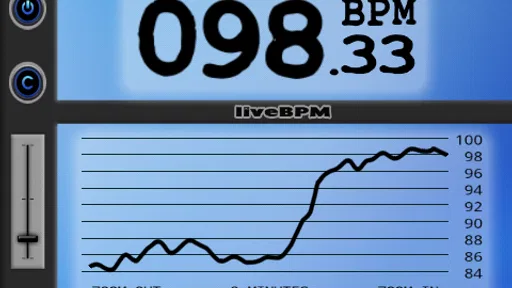
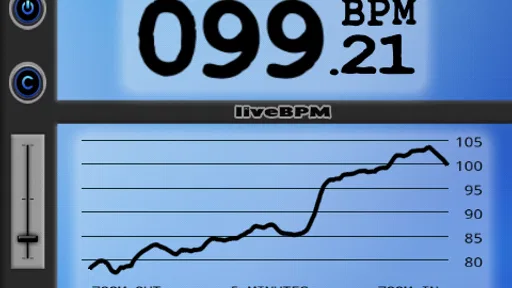
At a glance, the large BPM display and color-coded meter are easy to follow. That matters in rehearsal, where I would rather keep my attention on the musicians than navigate a crowded screen. The meter also offers a visual sense of movement, so I can check whether the reading appears to follow the beat instead of relying on a number in isolation.
What microphone-based detection changes
Because the app listens through the phone, the setup is quick: there is no need to connect an instrument just to get a tempo estimate from music already playing nearby. The trade-off is that placement and room sound matter. A phone too far from the source, competing conversation, or a mix with a weak pulse can make the result less dependable. In a noisy room, moving the phone closer to the clearest speaker and away from side conversations is a practical first adjustment.
This is also why it differs from the usual alternatives. A tap-tempo tool asks you to mark the beat yourself, which can be effective when you can hear a clear pulse but awkward if you are busy playing. A metronome provides a beat you set; it does not identify the tempo of a song by listening. A full audio workstation offers much broader analysis and production control, but is excessive if all you need is a quick reading in a rehearsal room. This app sits between those options: convenient for live listening, narrower than studio software, and dependent on a usable acoustic signal.
Small workflow choices that improve the result
One useful habit is to check a stable section rather than a fill, breakdown, or transition. Those moments may contain extra hits or leave the main pulse less obvious, so a brief reading there can be misleading. I would use the display to establish the general tempo, then listen for whether the musicians are keeping that pulse consistently. The distinction matters: detecting a song’s beat and judging the quality of a performance are related but not the same job.
For a rehearsal note, I would record the section and the reading together, rather than keeping a tempo figure without context. A verse and a chorus may be intended to feel different even when their underlying pulse is similar, while a live performance may naturally vary. The history function can help with looking back at tempo changes, but the musician still needs to decide whether a change is expressive, accidental, or simply a detection wobble.
It can also help to make a quick reading before practice and compare it with one after several runs. If the later result is consistently higher, that is a prompt to listen for rushing, not proof by itself. Using the app this way turns a number into a rehearsal question instead of treating it as a score. That is a more useful role for a beat detector than trying to make every performance conform to a single fixed value.
Limits worth considering before relying on it
As with any microphone-based tempo reading, noisy surroundings are a real limitation. The original experience is that extreme noise can throw off readings, so I would not base a precise decision on a single result in a crowded room. Strong percussion can make the pulse easy to hear, but busy arrangements, syncopation, or a soft beat may leave more room for the reading to fluctuate. If the number jumps around, I would first change the phone’s position or choose a clearer passage rather than assuming the music has changed tempo.
The app is also not a replacement for a dedicated metronome when the task is to practice against a fixed click. A metronome is the better choice if I need a steady reference while playing, while this app is useful when I want to inspect music that is already sounding. Likewise, if I need detailed track editing or a broader production workflow, a workstation is a more suitable tool. Its strength is narrower and more immediate: listening to nearby sound and showing a tempo estimate.
Battery deserves a little planning during long sessions. Keeping an app active while it listens can use power, so I would check the phone’s charge before a lengthy rehearsal or dance practice rather than assume it can run indefinitely. The microphone-based approach also means I would use it in a setting where recording or listening through the phone is appropriate, and keep the device near the source without putting it where it will be knocked over or obstruct musicians.
Who should choose it—and who should pass
I think it makes the most sense for musicians who regularly need a quick tempo reference, especially people rehearsing with others and trying to diagnose rushing or inconsistent sections. It is also a practical option for dancers who want a clearer sense of a track’s pace, and for listeners who enjoy exploring rhythm. If you mainly want to set a beat and practice to it, choose a metronome instead. If you need detailed analysis beyond a tempo estimate, a more comprehensive audio tool will suit you better.
The app is in the Music & Audio category, comes from developer Daniel Bach, and is rated for Everyone. It costs $3.99, so I would weigh the price against how often I expect to use a microphone-based tempo check. Its average rating is 4.2 from around 590 ratings, and it has more than 10,000 installs. Those figures suggest an established niche audience, but the more important question for me is whether live tempo checking solves a recurring problem in your own practice.
Version, compatibility, and the buying decision
The current version is 1.2.2, and the app requires operating system version 7.0 or later. It was released on March 30, 2012, so I would make compatibility with my particular device and software setup part of the decision, especially if I rely on a newer phone for rehearsals. The price is a one-time purchase rather than a reason to expect a full production suite: what I would be paying for is a focused way to observe the tempo of sound around me.
Before buying, I would ask myself whether I need to identify a beat while music is playing, or whether I actually need a tool to produce a beat, edit audio, or organize tracks. That distinction makes the choice clearer. The first need fits this app’s purpose; the others point toward a metronome, audio workstation, or music library tool. For someone who has repeatedly guessed at rehearsal tempos, a compact dedicated detector can be worth having. For an occasional curiosity, tapping along or using a tool already in your setup may be enough.
A focused rhythm companion, not a studio in your pocket
When I first downloaded liveBPM - Beat Detector, I was skeptical about how accurately a mobile app could measure tempo. But, to my pleasant surprise, it’s pretty spot on! You fire up the app, and it uses your smartphone’s microphone to pick up the music playing around you. Within seconds, it analyzes the audio and displays the BPM. It’s almost like having a metronome in your pocket, but way cooler.
The interface is straightforward, which is great because nobody wants to fiddle with complicated settings when they’re in the groove. The app opens to a clean screen displaying the BPM in large, easy-to-read numbers. There’s a color-coded meter that swings with the beat, providing a visual cue that’s both practical and aesthetically pleasing.
One of the coolest features is the history function. It lets you track BPM changes over time, which can be super useful if you’re trying to analyze a live performance or practice session. You can see where the tempo fluctuated and make adjustments accordingly.
As a musician, I found liveBPM invaluable for band rehearsals. It’s a game-changer when everyone’s trying to lock in on the same beat. But it’s not just for musicians. Dancers can use it to keep time with their routines, and DJs might find it helpful when matching tracks. Even if you're just curious about the tempo of your favorite songs, this app has you covered.
While liveBPM - Beat Detector excels in many areas, there are a few things I'd love to see in future updates. For instance, a feature that allows integration with streaming services could be a neat addition, making it easier to analyze playlists without needing external speakers. Additionally, while the app does a decent job in noisy environments, extreme noise can still throw off the readings occasionally.
Battery usage is another consideration. Like most apps that require constant microphone access, it can be a bit of a drain on your phone's battery. So, if you’re planning a lengthy jam session or dance practice, make sure to have a charger handy!
All in all, if you’re someone who loves rhythm and wants to understand it better, liveBPM - Beat Detector is a fantastic app to have on your phone. Its ease of use, accuracy, and useful features make it a go-to tool for anyone interested in music or dance. So, whether you’re a seasoned musician or just a curious listener, give it a try. Who knows? You might just discover a new aspect of music you hadn’t noticed before.
So go ahead, download it, and let the beats guide you!
Verdict
Strengths of liveBPM - Beat Detector
- Accurate tempo detection for various music genres.
- User-friendly interface with intuitive controls.
- Real-time BPM display enhances practice sessions.
- Compatible with external audio devices for precision.
- No ads, ensuring an uninterrupted experience.
Limitations of liveBPM - Beat Detector
- Limited features in free version; premium needed.
- Occasional lag on older devices.
- Requires background noise-free environment.
- No integration with popular music streaming apps.
- Lacks advanced editing tools for professionals.
Similar Picks in This Category
View All
YouTube Music
Google LLC4.4

Samsung Music
Samsung Electronics Co., Ltd.3.8

Spotify: Music and Podcasts
Spotify AB4.3

JioSaavn - Music & Podcasts
Saavn Media Limited4.3

Lark Player:Music Player & MP3
Lark Player Studio - Music, MP3 & Video Player4.6

StarMaker: Sing Karaoke Songs
SKYWORK AI PTE. LTD.4.3
Frequently Asked Questions
What is liveBPM - Beat Detector and how does it work?
liveBPM - Beat Detector is a mobile application designed to accurately measure the tempo of music in real-time. Musicians and DJs can benefit from its precision by using their device's microphone to detect the beats per minute (BPM) of a song. It works by analyzing the audio signal and providing instant feedback on the tempo.
Is liveBPM - Beat Detector user-friendly for beginners?
Yes, liveBPM is designed with a straightforward interface that is suitable for users of all skill levels. Beginners will find it easy to navigate with its intuitive controls and clear display of BPM readings. The app provides a seamless experience without requiring extensive technical knowledge.
Can liveBPM handle all types of music genres?
liveBPM is versatile and can handle a wide range of music genres. Whether you are dealing with fast-paced electronic music or slower classical pieces, the app is capable of accurately detecting the tempo. It is particularly useful for musicians who play in bands or orchestras, as it adapts well to various musical styles.
Does liveBPM require an internet connection to function?
No, liveBPM does not require an internet connection to function. Once installed on your device, it operates offline, allowing you to use it in a variety of settings, whether you're on stage, in a studio, or practicing at home. This makes it convenient for musicians who need a reliable tool on the go.
Is liveBPM available for both Android and iOS devices?
Yes, liveBPM is available for download on both Android and iOS platforms. Users can find it on the Google Play Store for Android devices and the App Store for iOS devices. This cross-platform availability ensures that a wide audience can access and benefit from its features, regardless of their preferred operating system.
